

The label “DCAA-approved” can send small businesses searching for a software shortlist in the wrong direction: DCAA doesn’t approve or endorse specific accounting products. If you’re comparing DCAA approved accounting systems for small business, the key question is whether your complete accounting system, including its software, procedures, and personnel, can support accurate contract-cost accumulation and documented controls.
It’s reasonable to worry that a general-purpose accounting setup may not handle contract-level tracking, or that a vendor’s compliance claims guarantee acceptance. They don’t. DCAA evaluates the contractor’s system for adequacy, with the SF 1408 serving as a guide to the criteria, rather than certifying a particular software brand.
In this guide, we’ll clarify the difference between choosing software and demonstrating system adequacy, then compare general-purpose tools with government-contracting platforms according to contract complexity and operational needs. We’ll also outline the controls commonly examined, including cost segregation, timekeeping, indirect-cost allocation, and the treatment of unallowable costs. You’ll leave with a practical framework for assessing your current setup, documenting procedures, and identifying next steps that align with your contracts and growth plans.
Key Takeaways
- Use your contract mix and cost-tracking needs to define what your accounting system must support before comparing vendors.
- Evaluate DCAA approved accounting systems for small business by comparing system categories against labor workflows, reporting needs, controls, and growth plans.
- Document how your team handles costs and supporting records to identify gaps between written procedures and everyday practice.
- Separate essential capabilities from optional automation so you can prioritize current compliance needs without limiting future scalability.
- Consider DCAA compliance consulting to assess system readiness and strengthen audit preparation, without treating advice as a guarantee of an adequacy determination.
What 'DCAA-Approved Accounting System' Means for a Small Business
“DCAA-approved accounting system” is a common search phrase, but it can blur an important distinction: accounting software is only one component of a contractor’s accounting system. The Defense Contract Audit Agency (DCAA) evaluates contractors’ systems in connection with government contract requirements. A software feature list alone doesn’t establish whether your processes and records are adequate for your circumstances. In our DCAA compliance consulting work, we focus on assessing that broader system fit, not endorsing a software product.
Working definition: A software product provides tools for recording and reporting financial activity; an accounting system is the combination of those tools, your documented procedures, internal controls, records, and consistent practices that support contract-cost accumulation and review.
Does DCAA approve accounting software products?
Don’t treat “DCAA compliant” in a vendor’s marketing as evidence that DCAA has certified or endorsed its product. The distinction is between a product’s capabilities and an agency assessment of how a contractor’s complete system operates. Buying or installing software cannot, by itself, establish that your accounting practices or supporting records meet the needs of a particular contract.
For a pre-award accounting-system survey, SF 1408 provides a framework for assessing system adequacy. The assessment concerns how you accumulate and support costs, not simply which application you use. We recommend comparing vendor claims with documented capabilities, then determining whether your procedures and actual use support the controls relevant to your contracts.
Why accounting-system readiness matters to a small contractor
As your contract work grows, reliable records become essential to understanding where labor and other costs belong, how project activity appears in financial reports, and what documentation supports recorded transactions. Your system needs depend on contract type and operations. A setup that works for basic bookkeeping may need additional processes or configuration to provide the contract-level visibility your work demands.
Documented procedures help your staff handle transactions consistently and give reviewers a clearer path from source records to reported costs. Written instructions can clarify who records labor, how project costs are coded, and where supporting documentation is retained. These practices support operational discipline and audit readiness, but they don’t guarantee a particular review outcome. Our role is to help contractors assess readiness and identify practical compliance considerations.
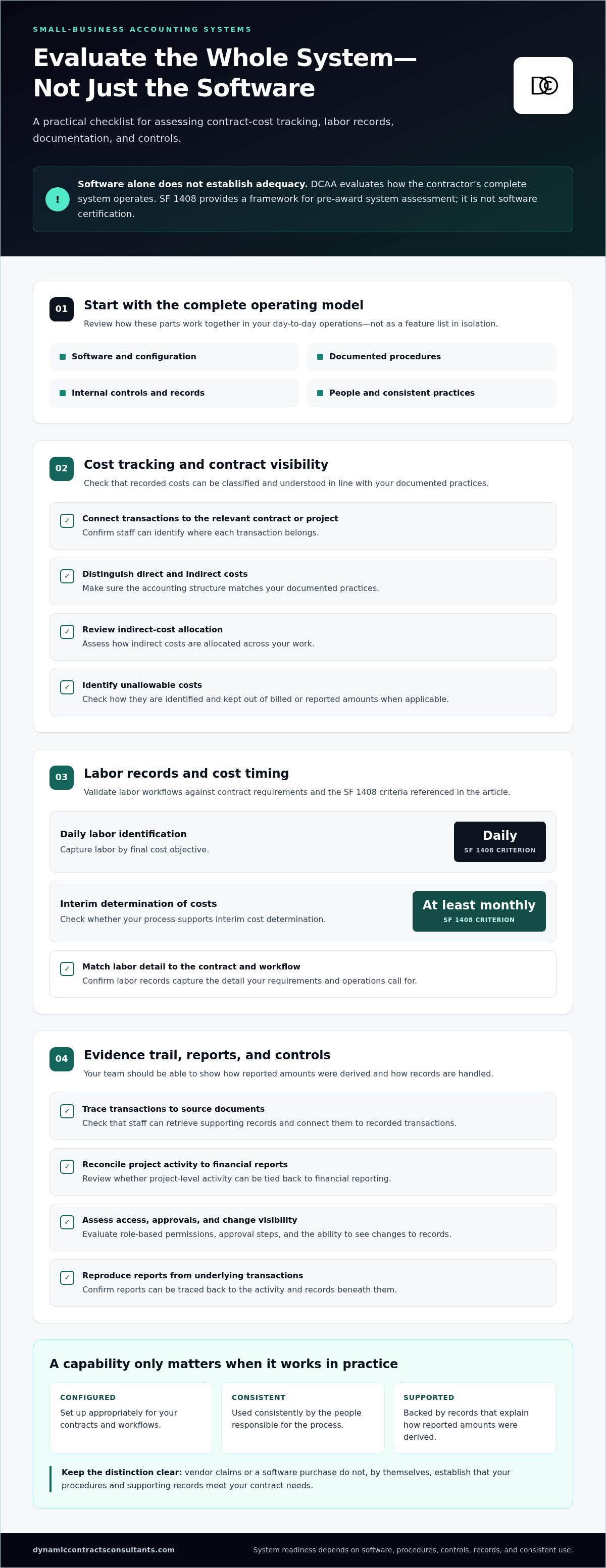
When assessing DCAA approved accounting systems for small business, evaluate the full operating model: software, configuration, procedures, controls, records, and the people responsible for applying them. That system-level view gives you a more useful basis for comparing options and planning for contract growth.
Which Accounting-System Capabilities Should Small Contractors Evaluate?
Start with your contract requirements and actual workflows, not a vendor’s feature list. The DCAA’s DCAA Accounting System Requirements resource provides a reference point for understanding pre-award system evaluation. We recommend using it alongside an assessment of whether your system, configuration, and procedures can produce consistent, supportable records for the work you perform.
System effectiveness depends on controls and operating procedures as well as software features. A capability matters only if it’s configured appropriately, used consistently, and supported by records that let your team explain how reported amounts were derived. In our DCAA compliance consulting work, we help contractors assess those connections without treating any single feature as a guarantee of system adequacy.
Cost tracking, labor records, and supporting documentation
Assess whether transactions can be associated with the relevant contract or project, and whether your accounting structure distinguishes direct from indirect costs in a way that matches your documented practices. Consider how indirect costs are allocated, how unallowable costs are identified and kept out of billed or reported amounts when applicable, and whether labor records capture the detail required by your contract and workflow. For pre-award assessment, SF 1408 criteria include daily labor identification by final cost objective and an interim determination of costs at least monthly.
Check the evidence trail, too. Can staff retrieve source documents, connect them to recorded transactions, and reconcile project-level activity to financial reports? Review these workflows with finance personnel and a qualified compliance adviser before selecting a platform. We encourage teams to validate proposed processes with the people who will perform them, since the appropriate configuration depends on your contracts and circumstances.
Controls, reports, and audit trails
Evaluate how the system handles access, review, and traceability. Ask whether you can configure role-based permissions, establish approval steps, see changes to records, and reproduce reports from underlying transactions. Reconciliation tools and data exports may also matter if your payroll, timekeeping, or project-management processes rely on separate systems. Treat these as evaluation questions, not as claims that every product includes the same functions.
- Reporting: Can users produce contract- and project-level views that support routine monitoring?
- Permissions and approvals: Can access and review responsibilities be configured to fit your procedures?
- Change history: Can staff trace adjustments and explain who made them?
- Reconciliation and exports: Can data be checked against supporting records and transferred into required workflows?
During vendor demonstrations, request realistic tasks, such as recording labor against a project, reviewing a cost entry, tracing a report to supporting documentation, and showing how an adjustment appears in the record history. Verify each claimed capability against current product documentation and the configuration you would actually use. This disciplined evaluation is more useful than relying on a “DCAA compliant” label when comparing DCAA approved accounting systems for small business.
General Accounting Software vs. GovCon Systems: How to Compare Options
Compare systems by how well they support your actual contract workflows, not by category labels or vendor claims. General-purpose accounting tools, government-contracting platforms, and broader enterprise resource planning (ERP) systems can differ in focus and configuration needs, but no category or product name establishes that a contractor’s system will be adequate. We recommend using the SF-1408 requirements as a reference, then assessing each option against your specific operations.
| Comparison area | General-purpose accounting | GovCon-focused platform | Broader ERP system |
|---|---|---|---|
| Contract-cost detail | Check whether project-level tracking can meet your needs. | Verify how contract-cost workflows match your requirements. | Assess whether the system can represent your contract structure. |
| Labor workflows | Confirm how labor data is captured and connected to projects. | Test the labor process against your documented procedures. | Check configuration and integration with labor-record processes. |
| Controls and reporting | Test permissions, review steps, and report traceability. | Verify controls and reports through a workflow demonstration. | Assess control configuration and reporting across relevant functions. |
| Scalability and configuration | Identify any gaps as contract complexity grows. | Evaluate fit with current and planned contract operations. | Consider configuration scope, integration, and staff training. |
When an existing general-purpose system may merit assessment
Don’t assume you must replace your current software before identifying gaps. Map how it captures contract and project costs, labor records, direct and indirect cost treatment, approvals, and supporting documents. We suggest comparing those workflows with your contract needs and applicable criteria. QuickBooks, for example, should be assessed in context: the product name alone can’t establish acceptability or inadequacy. Check current DCAA guidance and evaluate your configuration, procedures, and records.
When a GovCon-focused system or ERP may fit better
A specialized platform or ERP may be worth evaluating as contract complexity, reporting demands, project volume, or planned growth increases. Treat vendor examples, including Unanet or Deltek Costpoint, only as research leads, not endorsements or evidence of DCAA acceptance. We recommend requesting demonstrations based on your workflows and verifying claims against current product documentation. Compare integration, configuration, implementation effort, and staff training alongside features.
For DCAA approved accounting systems for small business, the useful comparison is a system’s documented fit with your contract requirements and daily operations. We encourage contractors to evaluate first, then determine whether improved configuration, revised procedures, or a different platform addresses identified gaps. Keep this comparison focused on selection; implementation planning is a separate step.
How to Select and Validate a System Before Committing
A disciplined selection process reduces the risk of choosing software that looks capable in a demonstration but doesn’t fit your contract workflows. For DCAA approved accounting systems for small business, assess the full operating model: requirements, procedures, configuration, staff readiness, and the records the system produces. Separate capabilities needed for current contracts from automation or expansion features that may support a future state.
- 1. Map requirements. Inventory your contract types, accounting processes, existing tools, and reporting obligations. Confirm which requirements apply to your specific contract circumstances with a qualified compliance adviser.
- 2. Document workflows. Record how labor, costs, approvals, and source documents move from the point of entry through review, reconciliation, and reporting. Include who performs each step and what evidence is retained.
- 3. Identify gaps. Compare current processes with your documented requirements. Classify each gap as a must-have capability, a procedure or training issue, or an optional improvement, such as additional automation.
- 4. Compare systems. Evaluate shortlisted options against the must-haves first. Record assumptions about configuration, integrations, data migration, and any manual workarounds so comparisons reflect your likely operating model.
- 5. Test controls. Validate routine workflows with realistic scenarios before committing. Capture test results, exceptions, decisions, and unresolved issues for follow-up.
Map business needs to requirements and workflows
Build the requirements map with finance and operations staff, not only the software administrator. For example, trace a labor entry from submission through approval and reporting, then follow a project cost from its source record to reconciliation. This reveals where responsibility, supporting evidence, or system configuration needs clarification. Ask a qualified adviser to review requirements that depend on contract terms and your circumstances.
Test vendors and prepare for implementation
Ask each vendor to demonstrate your representative workflows, including indirect-cost allocation where relevant, reconciliations, report generation, and retrieval of supporting records. Confirm what the vendor, your team, or another provider is responsible for during migration, integrations, configuration, and user training. Document exceptions rather than relying on verbal assurances. Readiness depends on implementation, written procedures, trained personnel, and retained evidence, not on selection alone. Related DCAA audit-preparation considerations can help inform your readiness plan.
We can help you assess accounting-system readiness and connect your selection decisions to broader strategic compliance needs. Explore our DCAA compliance consulting services for support evaluating system fit and preparation priorities.
DCAA Accounting-System Consulting and Practical Next Steps
Select a system for verified capabilities, documented controls, and fit with your contract requirements, not for a “DCAA-approved” label. Software selection is one decision within a broader compliance process: your procedures, configuration, personnel, and supporting records all affect how effectively the system works in practice. Dynamic Contracts Consultants LLC provides DCAA compliance consulting and audit support to help contractors assess system readiness. This is advisory support, not software sales or a guarantee of an adequacy determination.
When outside compliance support can add value
Outside expertise may be useful when your team is uncertain how contract-specific requirements apply, whether controls are documented clearly, or whether known system gaps require changes to software, workflows, or both. Dynamic supports audit-ready record preparation and compliance risk management, helping contractors examine readiness without promising a particular review outcome. For continuing obligations after award, our post-award compliance services connect system practices with ongoing contract administration.
A structured DCAA compliance consulting framework can help organize questions about system fit, internal processes, and preparation priorities. Use that analysis to distinguish software limitations from process gaps, then assign practical next steps to the appropriate team members.
Prepare for a focused accounting-system discussion
Bring useful working materials to an initial discussion so the conversation can focus on your actual environment. Relevant items may include:
- A summary of your accounting software, configuration, and connected tools.
- Contract workflows showing how labor, costs, approvals, and source records are handled.
- Current accounting policies, relevant reports, and reconciliation practices.
- Known process gaps, selection decisions, implementation questions, and upcoming review concerns.
These materials can help clarify which issues require immediate attention and which belong in a longer-term system plan. For contractors comparing DCAA approved accounting systems for small business, the objective is a defensible decision based on evidence, controls, and contract-specific needs, not a software purchase presented as a shortcut to compliance.
Discuss your DCAA compliance needs with our team to explore advisory support for system readiness and audit preparation.
Make Your Accounting-System Decision with Confidence
The right accounting system is not defined by a “DCAA-approved” label. It is the system, procedures, controls, personnel, and supporting records working together to meet your contract-specific needs. As you compare DCAA approved accounting systems for small business, focus on verified capabilities, documented workflows, and how consistently your team can produce traceable cost and labor information.
Before committing to a platform, identify gaps in your current processes, test vendor claims against realistic workflows, and distinguish essential controls from optional features. A well-planned decision can support operational efficiency as your contract portfolio grows, but software alone cannot guarantee an acceptable review outcome.
Dynamic provides specialized DCAA compliance consulting and audit support, including assistance with audit-ready record preparation and compliance risk management. Our lifecycle support spans acquisition planning and post-award compliance, helping you connect accounting-system readiness to broader strategic compliance needs.
Discuss your DCAA compliance needs with our team. With a clear assessment and practical next steps, you can strengthen your readiness and make a system decision aligned with your business’s growth.
Frequently Asked Questions
Does DCAA approve or certify accounting software?
No. DCAA does not approve, certify, or endorse individual accounting software products. Its review concerns a contractor’s accounting system as operated, which includes software, documented policies and procedures, controls, records, and personnel. A vendor’s “DCAA compliant” description is not an agency certification. Treat product claims as a starting point for due diligence, then assess whether your configuration and routine practices support your contract-related accounting needs.
Can a small business use QuickBooks for government contracting?
Possibly, but the software name alone cannot establish whether your accounting system is adequate for your contract work. Assess whether your configuration and procedures support the needed contract-level cost records, labor tracking, cost treatment, reporting, and documentation. Do not assume QuickBooks is automatically accepted or unsuitable. Check current DCAA guidance, review your contract circumstances, and confirm that the system you actually operate can support the required workflows.
What makes an accounting system DCAA compliant?
There is no software label that guarantees DCAA acceptance. System adequacy depends on whether the contractor’s accounting tools, controls, written procedures, records, and personnel support the applicable contract needs. SF 1408 criteria include separating direct and indirect costs, identifying employee labor by final cost objective daily, allocating indirect costs consistently, excluding unallowable costs, and determining costs on an interim basis. The relevant assessment depends on your circumstances and system operation.
Does a small government contractor need GovCon accounting software?
Not necessarily. A general-purpose system may merit assessment if its configuration and procedures support your contract workflows and recordkeeping needs. A GovCon-focused platform or ERP may be worth comparing as contract complexity, project activity, or reporting demands grow. Evaluate actual capabilities, integrations, configuration effort, and staff training rather than assuming a specialized product is required. The appropriate choice depends on your contracts and how your business operates.
How do I choose an accounting system for federal contracts?
Begin by mapping your contract types, accounting workflows, reporting needs, existing tools, and supporting records. Identify must-have controls and capabilities, then compare systems against those needs. Ask vendors to demonstrate representative tasks, such as tracking project costs, reconciling records, and producing reports, and verify claims against current product documentation. For DCAA approved accounting systems for small business, the decision should focus on documented system fit, not a marketing label.
What does DCAA review during an accounting-system audit?
DCAA evaluates the contractor’s accounting system, rather than software in isolation. For a pre-award survey, SF 1408 provides criteria that include cost segregation, labor identification by final cost objective, indirect-cost allocation, treatment of unallowable costs, and interim cost determinations. The evaluation may also involve how procedures, controls, records, and personnel support system operation. Review scope and applicability depend on the contractor’s circumstances and the assessment being conducted.
Can accounting software alone make a company DCAA compliant?
No. Software can support accounting workflows, but it cannot independently establish written procedures, effective controls, accurate records, or consistent staff practices. For example, a system may offer project coding, but employees still need to follow the company’s process for entering and reviewing transactions. Readiness depends on implementation, configuration, training, and retained evidence as well as software capabilities. A purchase alone does not guarantee an acceptable review outcome.


